Four example scenarios, each with sample data: what an agent, an investor and a renter click on a Zillow listing, what Caza shows them, and what they do next. The addresses and numbers are made up; the clicks are the real ones.
A client texts a Zillow link the night before a showing
The situation. A buyer's agent gets a text at 8 pm: a Zillow link for 418 Maple Ave, a 3-bed, 2-bath single-family home listed at $595,000, and the question “Can we see this tomorrow? Is it priced OK?” The showing is at 10 am. The agent wants to reply tonight with something better than “sure.”
What they click, and what they see
Open the link. Caza’s card sits under the price: 100 · Hot, 270 saves, 3,793 views, 9 days on market, 30 saves a day, and a flag that the price was cut 4.0% ($25K) five days ago. Hovering the score shows which of the three signals is driving it.
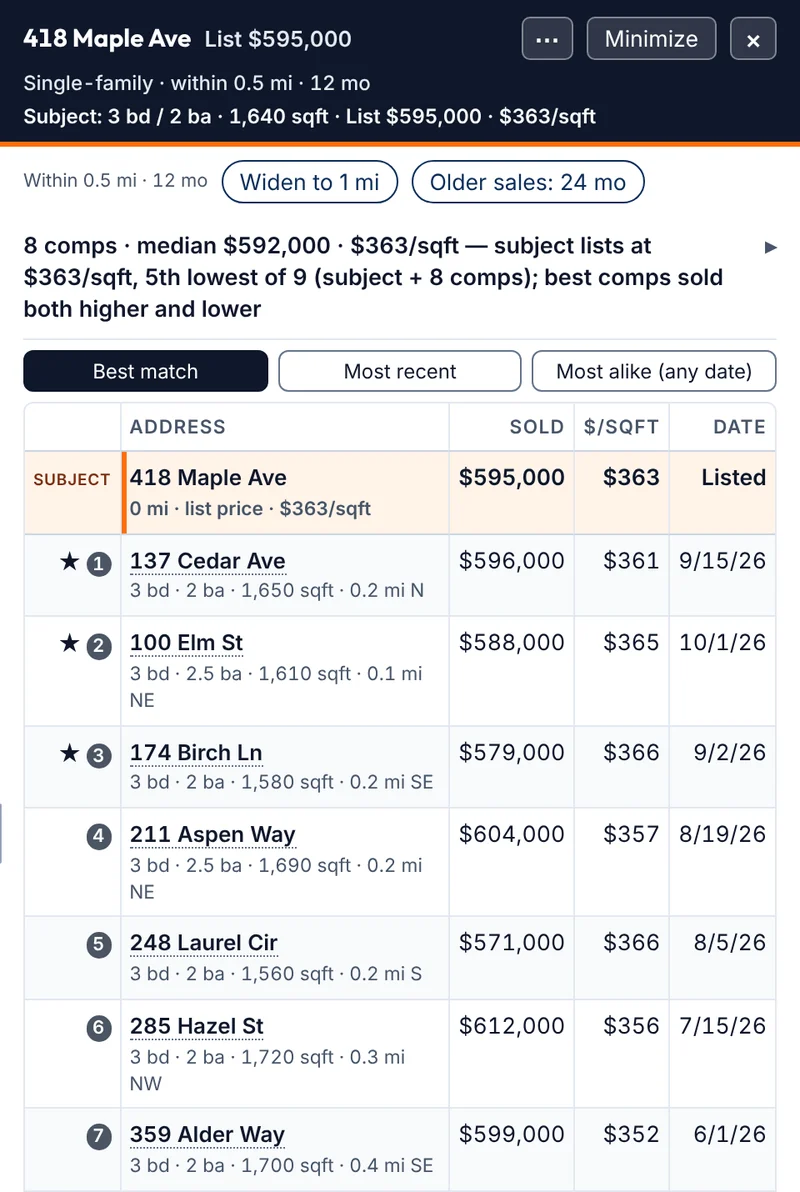
Click Sales comps. Caza opens Zillow’s own Recently Sold search centered on the home in a new tab and reads the sold rows on that page. The drawer shows 8 single-family sales within 0.5 mi from the last 12 months, median $592,000 and $363 per square foot, with the subject pinned as row one at $363 per square foot: 5th lowest of 9, with best comps sold both higher and lower.
Read the stars. Caza stars the three closest matches: 137 Cedar Ave ($596,000, 0.2 mi), 100 Elm St ($588,000, 0.1 mi) and 174 Birch Ln ($579,000, 0.2 mi), all 3-bed homes within about 60 square feet of the subject and sold in the last two months.
Click Copy summary. A plain-text summary of the drawer lands on the clipboard. The agent pastes it into their notes for the morning.
The card on the sample listing. Sample data.
What they do next
The agent writes the client a text in their own words. With these numbers it might read:
Yes, 10 am works. Heads up: this one is drawing a crowd on Zillow. 270 saves in 9 days, and they trimmed the price $25K last week. The 8 nearest sales from the past year ran right around $363 a square foot, which is where it’s listed now, with the closest three closing between $579K and $596K. If you like it in person, we should be ready to move the same day. I’ll bring the comps.
Nothing in that text is a promise about what the home will sell for. It’s what Zillow shows, said plainly. Before the showing the agent checks the three starred sales in the MLS, since Zillow can lag on recent closings and misses some entirely.
Copy summary is written for the agent, not the client. A client-ready text in one click is on the list for the next update; today the agent writes it.
By hand, for comparison
By hand this is the Sold filter, a drawn boundary, sorting a dozen results by type and size, and dividing eight sale prices by eight square footages: a laptop job, and not one most agents will do from the couch at 8 pm. In Caza it is two clicks, and the rest is reading.
The Sales comps drawer for the same sample listing.
Example scenario · sample data
Listing agentSales comps · Keep and remove · PDF report
Comps for a seller meeting, with the agent’s name on the report
The situation. Same sample home, other side of the table. A listing agent has 418 Maple Ave on the market at $595,000 after a $25K price cut. The seller wants to meet Thursday and asks the fair question: “Are we priced right now?” The agent wants to walk in with the nearby sales in one clean page rather than a stack of printouts.
What they click, and what they see
Open the listing and click Sales comps. The drawer reads Zillow’s Recently Sold page around the home: 8 single-family sales within 0.5 mi, last 12 months, median $592,000 and $363 per square foot. Condos and townhomes never enter a single-family set.
Check the stars. Caza scores each sale 0 to 100 on distance, months since sale, size, bed and bath difference and year built (price is never part of the score) and stars the top three: 137 Cedar Ave (93), 100 Elm St (90) and 174 Birch Ln (89).
Keep and remove. The agent clicks the check mark on 137 Cedar Ave to pin it to the top, since it is the sale the seller will remember. A comp that doesn’t fit gets the ×; it moves to an Excluded list the report still mentions, so nothing disappears quietly. If the set looks thin, Widen to 1 mi or Older sales: 24 mo adds more.
Click Print / Save PDF. The agent types their name and “Your Brokerage · (555) 010-0123” into the Prepared by fields once; Caza saves them on the device for every report after this.
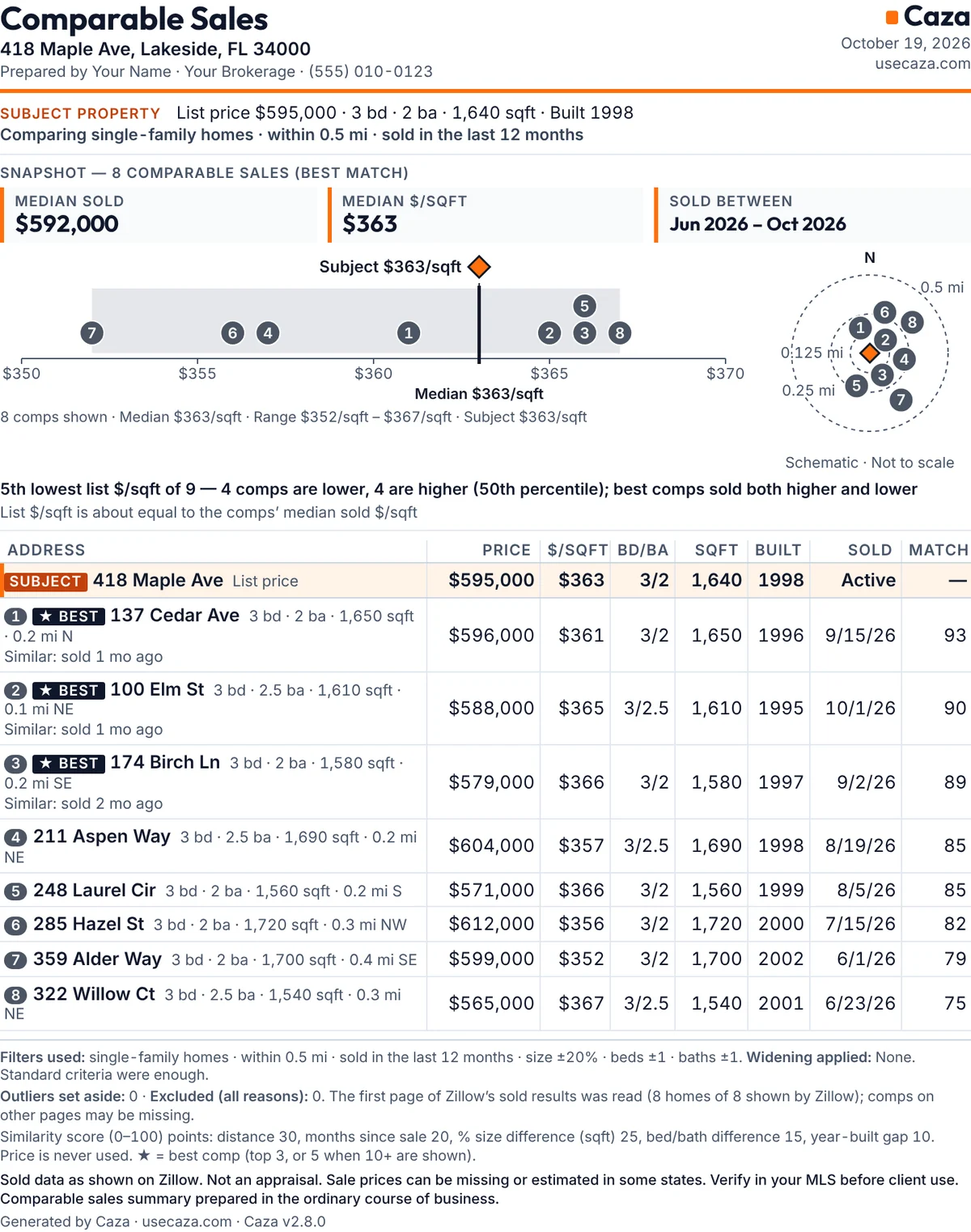
The report, page one. Sample data; the name and phone are placeholders.
What the report says
One US Letter page. The header has the address and the agent’s details. A snapshot shows median sold $592,000, median $363 per square foot, and sales between June and October 2026. A strip chart puts the subject at $363 among the eight comps, with a line of text underneath: 5th lowest of 9, 4 comps lower and 4 higher, list price about equal to the comps’ median. A schematic shows where each comp sits by distance. Then the table, with the three best comps marked and a reason line under each. The footer lists the filters used, anything set aside, how the match score works, and “Not an appraisal.”
What they do next
Before Thursday the agent opens the MLS and checks the eight sales against it, adding any closing Zillow hasn’t caught up on. In the meeting, the report does the talking: here are the sales, here is where we sit among them, here is why these three are the closest matches. The seller sees the agent’s name on it, not a portal’s. Comps print the same way for rentals, so a landlord client gets the same one-pager with asking rents.
By hand, for comparison
A comps page built by hand means a spreadsheet, a screenshot of a map, eight sale prices typed in and divided, and a layout in Word or Canva. The drawer plus the PDF is a few clicks, and the MLS check is the same either way.
Example scenario · sample data
Small investorRental comps · Investor numbers · Edited inputs
Screening a $310,000 house as a rental
The situation. An investor with one rental already is scrolling Zillow on a Sunday. 27 Orchard Rd comes up: a 3-bed, 2-bath, 1,450-square-foot house at $310,000, 14 days on the market. The question is whether it deserves a second look at all, before a spreadsheet, a lender call or a drive-by.
What they click, and what they see
Read the card. 74 · Warm, 41 saves, 980 views, 14 days, 2.9 saves a day. Steady interest, not a stampede.
Click Rental comps. Caza reads Zillow’s active rentals within 0.5 mi and keeps the 3-bed ones (bathrooms are shown on each row, not matched): 10 asking rents, typical range $2,380 to $2,490, median $2,418 a month and $1.63 per square foot, median 17 days listed. Each comp is listed by address, rent, size and distance. A banner says what these are: asking rents for active listings, not signed leases.
Click Use this rent. The $2,418 median goes into the investor numbers, tagged “Rental comps (asking).” The investor could have picked a single comp instead, or typed a rent of their own.
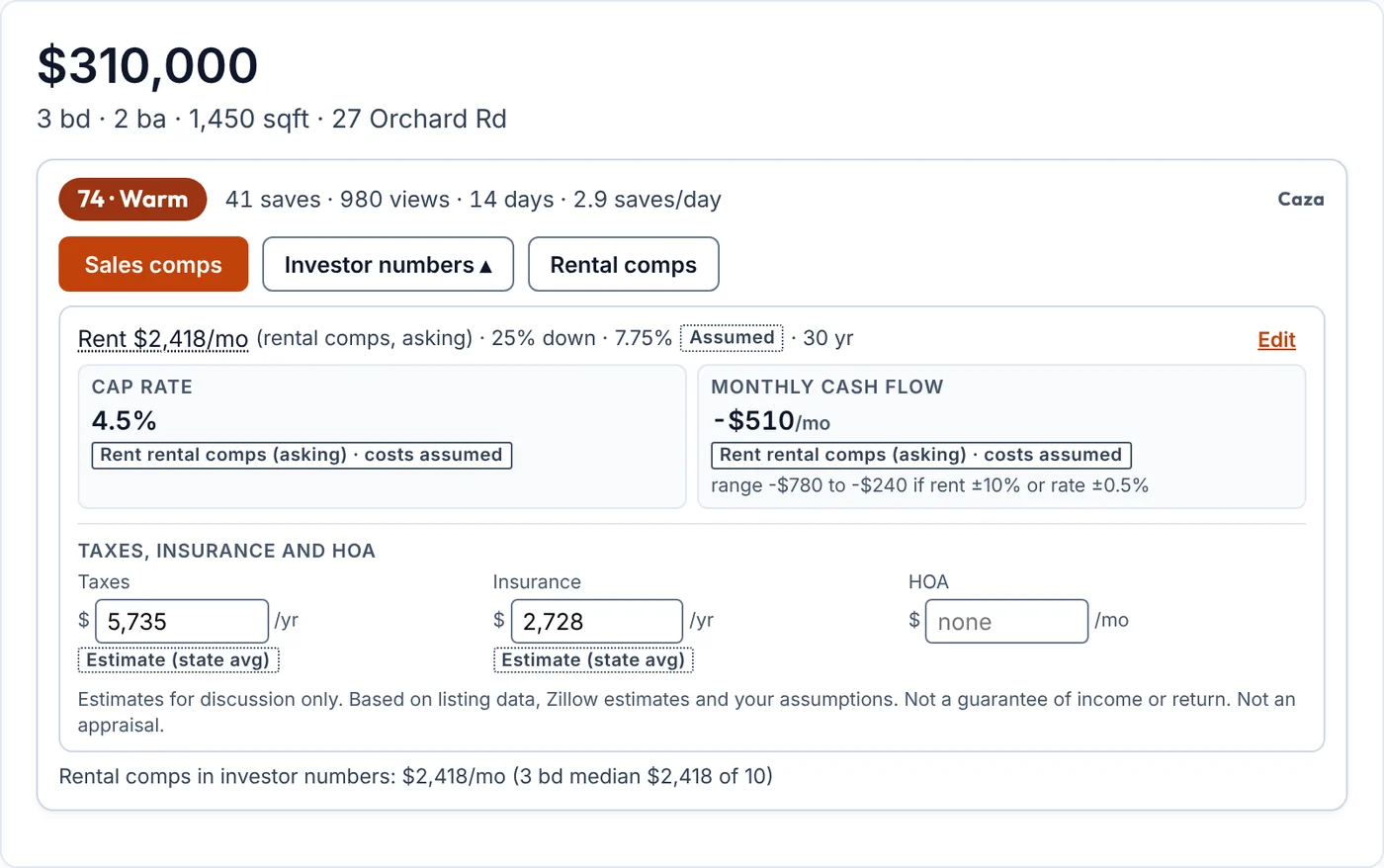
Open Investor numbers. The strip reads: Rent $2,418/mo · 25% down · 7.75% (Assumed) · 30 yr. Cap rate 4.5%. Monthly cash flow −$510, with a range of −$780 to −$240 if rent moves 10% or the rate half a point. Taxes $5,735 a year and insurance $2,728 a year are both tagged Estimate (state avg). HOA: none.
Click Edit. The investor replaces the assumed 7.75% with the rate their lender quoted last month and types the insurance figure from their existing rental. Each tag flips to Yours, the cap rate and cash flow recalculate on the spot, and “Use as my default for this state” keeps the insurance figure for the next listing. Vacancy, management, repairs and CapEx percentages sit in the same panel if the defaults don’t match how they run things.
Investor numbers before the investor edits anything. Sample data.
What they do next
At the median asking rent and 25% down, this house doesn’t cover its own mortgage. That is the answer the investor came for, and it took a few clicks. They don’t need to build a model to know this one only works with a bigger down payment, a lower price, or a rent at the top of the range, so they note it and keep scrolling. On the next listing the state tax estimate and their saved insurance default are already in place.
On a 2–4 unit listing the same panel shows price per unit, GRM and cap rate, with income from what the listing reports or from rental comps by unit type, never from a Rent Zestimate, and 5+ unit sales never mixed in.
By hand, for comparison
Done by hand: search rentals, open ten of them, note the rents, find the median, look up the county’s tax rate, guess at insurance, then a mortgage calculator and a spreadsheet for the operating costs. A lot of work for a house that turns out to be a pass. In Caza the first read is a few clicks, and the inputs that matter are labeled so nothing is trusted by accident.
Estimates for discussion only, based on listing data, Zillow estimates and your own assumptions. Not a guarantee of income or return. Not an appraisal.
Two apartments, the real monthly number, and one that doesn’t add up
The situation. A renter has two Zillow tabs open on a Saturday morning. Tab one is a 2-bed apartment at $2,450 a month with a “6 weeks free” banner. Tab two is a 2-bed, 2-bath condo, 77 Lake Ave Unit 4, at $1,200 a month, which looks too good. They want to know what each one really costs and whether either is out of line with the area before they fill out an application and pay a fee.
Tab one: the $2,450 apartment
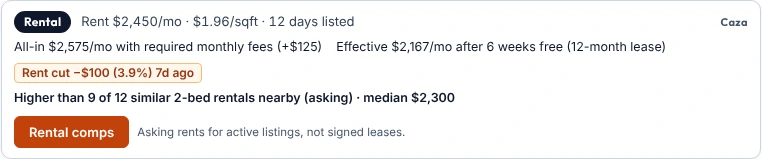
Read the renter card. On a rental listing Caza swaps its agent card for a renter one: Rent $2,450/mo · $1.96/sqft · 12 days listed. Below it, All-in $2,575/mo with required monthly fees (+$125 for the items the listing says are mandatory), and Effective $2,167/mo after 6 weeks free spread across a 12-month lease. A flag notes the rent was cut $100 (3.9%) seven days ago.
Read the comparison line. “Higher than 9 of 12 similar 2-bed rentals nearby (asking) · median $2,300.” So the sticker is above most of what is asking nearby, but the concession brings the effective number under the median for the first year.
Click Rental comps to see the twelve listings behind that line, each with rent, size, days listed and distance, before deciding whether $2,575 a month out the door is fine.
The renter card on the first sample listing.
Tab two: the $1,200 condo
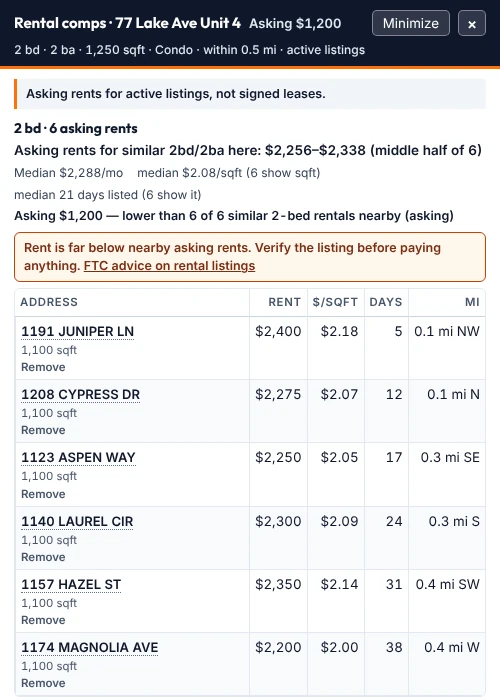
Click Rental comps. Six active 2-bed rentals within 0.5 mi: middle half $2,256 to $2,338, median $2,288 a month. The asking rent of $1,200 is lower than 6 of 6.
Read the caution. Caza prints it in a box: “Rent is far below nearby asking rents. Verify the listing before paying anything,” with a link to the FTC’s advice on rental listings.
The drawer on the second sample listing, with the caution.
What they do next
For the $1,200 condo, the renter does what the box says: they don’t send a deposit or an application fee to anyone they haven’t met, and they ask to see the unit with someone who can prove they manage it. A rent at half the area’s asking range isn’t always a problem, but it is always a reason to check. For the $2,450 apartment, they go in knowing the first-year number is $2,167 a month and the second-year number, if the fees stay, is $2,575, and they ask about both at the tour.
By hand, for comparison
Adding up required fees from the fine print, working out what six free weeks come to over a year, and opening a dozen nearby listings to see where $2,450 falls is a chore per apartment, and most people skip it. Caza shows all three numbers on the card as the page loads, and the comps are one click.
Rents shown are asking rents for active Zillow listings, not signed leases, and the comparison is to similar listings by bedrooms and property type only.
Every walkthrough above is a few clicks on a listing you already have open.
These are example scenarios with sample data, not customer stories. Caza is independent and not affiliated with Zillow. Comps and rents come from public Zillow pages and are a starting point, not an appraisal. Free right now.
 Caza
Caza