 Caza
Short answer: Zillow shows recently sold homes as pins when you switch its map search to Sold, but it doesn’t show the comps you picked next to the home you’re pricing. The free way is to copy each comp’s address into Google Maps (or a Google My Maps list) with the subject. The faster way is the Caza Chrome extension: open Sales comps on the listing and click Show all properties on map to see the subject and every comp, numbered, with price, price per square foot and sale date.
Why look at comps on a map?
A list of nearby sales tells you prices. A map tells you which of those prices belong in the comparison. Two sales the same distance away can sit in very different places:
- Across a freeway, rail line or busy road. Buyers often price the two sides differently.
- Across a city, school or tract line. A different tax rate, school or builder can move price per square foot on its own.
- On a quiet street versus a main road. Same size and age, different buyer.
- Next to a park, water or commercial strip. Location premiums and discounts that a table can’t show.
Seeing the subject and the comps together on one map is the quickest way to spot a sale that looks close on paper but isn’t. If you haven’t picked comps yet, start with how to pull comps on Zillow, then come back here.
The free way: Zillow plus Google Maps
- Find the sales on Zillow. On the Zillow map search around the home, switch the status from For Sale to Sold and set how far back to look (3 to 6 months is a common start). Each sale shows as a pin.
- Pick your comps. Keep the same property type, bedrooms within one and living area within about 20 percent. Note each address, sold price, square footage and sale date.
- Put them on one map. Paste each address into Google Maps, or make a Google My Maps map and add the subject plus each comp as a point (My Maps can also import a spreadsheet of addresses).
- Read the map. Drop any comp that sits across a line the market cares about, and look for a closer sale you missed.
It works, and it costs nothing. It also takes a while, and the map is gone once you close the tab.
The faster way: Caza’s comps map
Caza is a Chrome extension that adds sales comps, rental comps, a Demand Score and investor numbers to Zillow listings. Here is the map part, step by step.
1. Open Sales comps on the listing
On a Zillow listing page, click Sales comps. Caza opens Zillow’s Recently Sold search around that home in a new tab and builds a comps drawer from the sold homes on that page. The best matches are starred, and each row shows the sold price, price per square foot, sale date and a short line such as “3 bd · 2 ba · 1,690 sqft · 0.2 mi NE”, so you already know how far away each sale is and in which direction.
2. Check any single comp on the map
Every address in the drawer has a Map link that opens it in Google Maps and a Zillow link that opens the sold listing. Use Street View to check the block, or the satellite view to see what sits between the comp and your home.
3. Put the subject and every comp on one map
Click Show all properties on map. A map opens in a new tab with the subject and each comp as a numbered pin, using the same numbers as the drawer. A side list gives each comp’s price, price per square foot and sale date. It maps up to 25 comps that have a location. The comp list travels in the part of the link after the # sign, which browsers don’t send to our server; the map images come from OpenFreeMap.


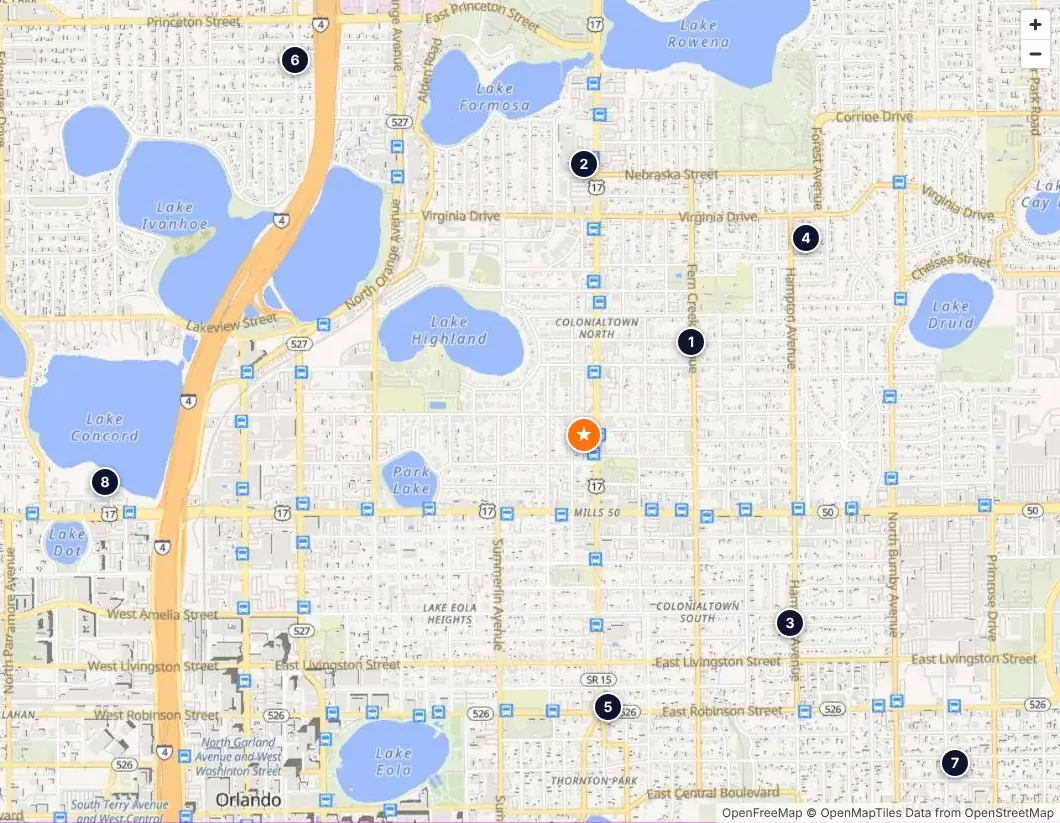
4. Tighten the set
Back in the drawer, pin the comps you trust and remove the ones the map shows are on the wrong side of a line. If there aren’t enough sales, More lets you widen the distance or include older sales, one click each. Caza keeps property types in separate pools, so a condo doesn’t end up next to a house. Open the map again after you change the list.
5. Share it as a PDF
Click Print / Save PDF for a one- or two-page comps report. Every address in the report is clickable, each comp has a Map link, and the same Show all properties on map button sits above the comps table, so whoever reads it can open the map too. A small schematic shows where each comp sits by distance.
What to look for once the comps are on the map
- Clusters. If most comps sit on one side of the subject, look for a sale on the other side before you trust the median.
- Outliers by price per square foot. A comp far above or below the rest is often explained by where it is: a corner on a busy road, a view lot, a different tract.
- Lines the market cares about. Freeways, rail, rivers, city and school lines. When in doubt, keep sales on the subject’s side.
- Distance versus date. A slightly older sale on the same street can be a better comp than a new sale a mile away.
Then run the numbers: the free comps price per square foot calculator turns your final list into a median and a value range. For a rental, the same thinking applies to rental comps.
Limits to keep in mind
The map shows sales as Zillow shows them. Caza reads the first page of Zillow’s Recently Sold results, so a very busy area may need a narrower search. In non-disclosure states such as Texas, many sales have no public price. Recent closings can take weeks to appear. A comps map is a fast, honest first read, not an appraisal. Agents should check the comps in the MLS before client use.
FAQ
Can you see comps on a map on Zillow?
Partly. On Zillow’s map search you can switch the status to Sold and see recently sold homes as pins. What it doesn’t do is mark which of those sales you picked as comps or put them in one numbered list next to the home you’re pricing, so most people copy the addresses into Google Maps or use an extension.
How far away should comps be?
As close as you can get while still matching the home. In a dense area roughly half a mile is usually enough; in suburbs and rural areas you widen until you have a handful of sales. Distance matters less than staying on the same side of anything that splits the market, like a freeway, a busy road, a city line or a different tract.
Does Caza’s comps map need a membership?
The map opens from the Sales comps drawer or the comps PDF, so it comes with a sales comps report: 3 a month without a membership (rental comps have their own 3), unlimited with one. The comp list travels in the part of the link after the # sign, which browsers don’t send to our server; the map images come from OpenFreeMap.
Is a comps map an appraisal?
No. It shows where recent Zillow sales sit around a home so you can judge which ones really compare. Sale data is what Zillow shows. Agents should check the comps against the MLS before putting numbers in front of a client.
Can I use this for rental comps too?
Not yet. The map is for sales comps; rental comps rows link to each listing.
Want the subject and every comp on one map in a click?
Try the Caza Chrome extensionCaza is independent and not affiliated with Zillow. Zillow’s menus and features change, so check the current page. Example screens show sample data, not a real listing. Not an appraisal.